
Enroll 3.0 was successfully released the evening of August 26, 2025, and included the following items:
1. MultApply
For families, applying to multiple schools can feel like a marathon of repeating the same forms.
For administrators, that means:
- More data to manage
- More room for error
- More frustrated parents calling for help
With the new MultApply integration in SchoolMint Enroll, families can now submit a single application that covers multiple schools in your organization.
That means less stress for parents and fewer incomplete applications for you to chase down.
For your staff, all of those applications flow into one organized, centralized process, making it easier to track, review, and manage student placement across schools.
It’s a win-win: families feel supported, and your team spends less time on paperwork and more time focusing on students.
Learn more about this feature in the 3.0 Walkthrough.
2. Recruitment Module
Every school leader knows the hardest part isn’t just managing enrollment once applications arrive. Sometimes, the hardest part is making sure families discover your school in the first place.
Until now, most schools have had to juggle separate tools for marketing, tracking family inquiries, and managing enrollment. That meant extra work for staff, families slipping through the cracks, and no clear way to see what efforts were paying off.
With Recruitment (powered by SchoolMint Enroll), all of that changes.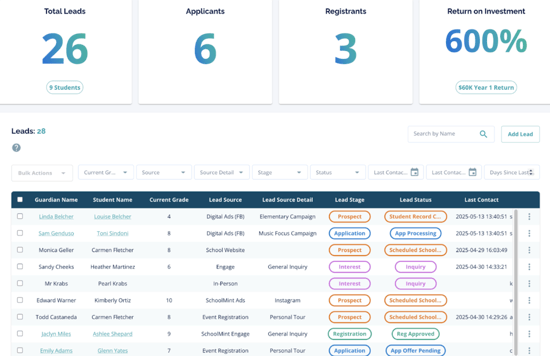
Recruitment brings outreach and enrollment together in one place so you can:
- Collect family inquiries through simple forms on your website
- Schedule and manage tours or open house events
- Automatically track and follow up with interested families
Note: The new Recruitment module is now available for single-site charter schools.
However, a district version is currently in development. If you’re a district leader looking to simplify outreach and enrollment in one connected system, we’d love to connect with you.
Learn more about this feature in the 3.0 Walkthrough.
3. Autofill Fields
If you’ve ever filled out school forms for more than one child, you know the frustration of typing the same address, phone number, and emergency contact information again and again. It’s tedious for families and also leads to more mistakes for your staff to clean up later.
With Autofill Fields, parents have to enter shared information only once. When they start a new application for another child, those details can automatically carry over.
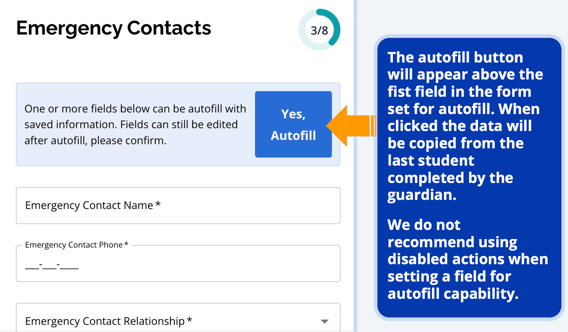
For families, this makes the process quicker and less stressful. For your team, it means fewer incomplete forms, fewer calls, and cleaner data.
Learn more about this feature in the 3.0 Walkthrough.
4. Nested Filters in Reports and Dynamic Views
When it comes to enrollment data, school staff often end up buried in spreadsheets or running multiple reports just to answer a simple question.
With Nested Filters, you can layer multiple filters together to create more precise reports and dynamic views.
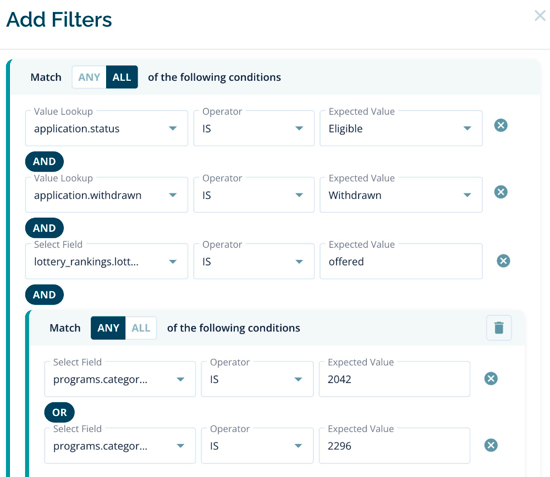
For example, you can see only students who accepted an offer in a specific program and are still missing a required document.
For school leaders, that means clearer visibility into enrollment trends. For staff, it means faster answers without juggling spreadsheets. And for families, it translates into better communication and follow-up when schools know exactly who needs attention.
Learn more about this feature in the 3.0 Walkthrough.
6. Accessibility Updates
For families using screen readers or navigating without a mouse, even small barriers can make the enrollment process impossible.
In this release, we’ve made important accessibility improvements, like allowing users to skip repetitive navigation and ensuring form fields stay visible when using keyboard navigation.
These updates make SchoolMint Enroll more inclusive for all families while also helping schools and districts meet accessibility standards with confidence.
Learn more about this feature in the 3.0 Walkthrough.
Enroll 3.0 Walkthrough Slides
Comments
0 comments
Article is closed for comments.